Best Practices
Help Desk Best Practices: Essential Strategies for High-Performing Support Teams
Why Help Desk Best Practices Matter for Support Teams
Support teams are the frontline of customer interaction, and their effectiveness directly impacts customer satisfaction and retention. Implementing well-defined help desk best practices ensures that teams work efficiently, reduce ticket resolution times, and deliver consistent service quality. These practices help avoid common pitfalls such as overwhelmed agents, inconsistent responses, and missed SLAs.
1. Organize Support with Teams & Queues
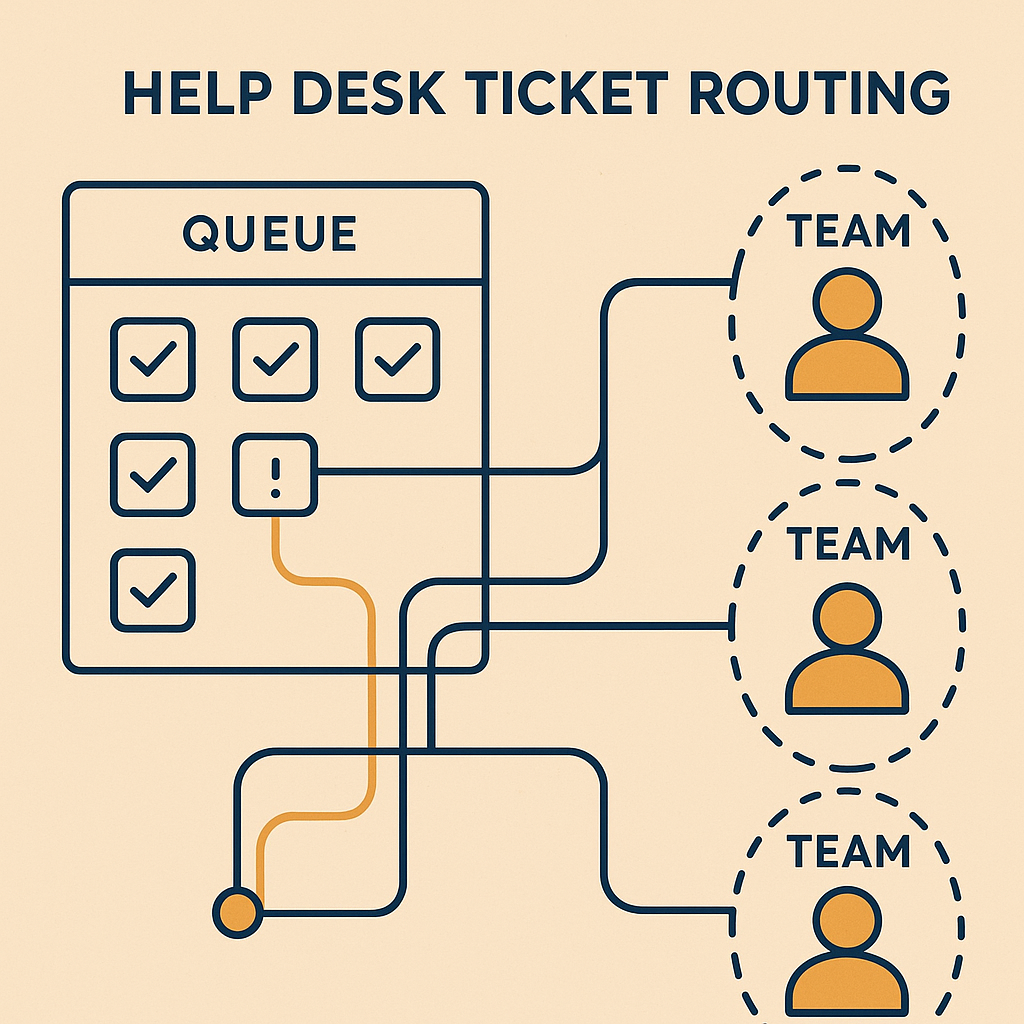
Structured ticket management is crucial. Use dedicated teams and queues to route tickets based on expertise or priority. For example, technical issues can go to a specialized technical support queue, while billing inquiries are handled by the finance support team. This reduces ticket handling time and prevents agents from juggling unrelated issues. AItocha’s Teams & Queues feature supports this by enabling intelligent ticket assignments and workload balancing.
2. Leverage a Comprehensive Knowledge Base
Equip agents and customers with a centralized knowledge base containing FAQs, guides, and troubleshooting steps. Agents can resolve tickets faster by referencing consistent information, and customers can self-serve for common questions. Regularly updating and auditing your knowledge base ensures it remains relevant and helpful. If you want to dive deeper into knowledge base management, check out our detailed guide on Knowledge Base Management Best Practices for Support Teams.
3. Implement SLA Compliance to Meet Expectations
Service Level Agreements (SLAs) set clear expectations on response and resolution times. Enforcing SLA compliance keeps support teams accountable and ensures customers aren't left waiting. Use automated reminders and escalation workflows to handle tickets nearing SLA violation. The SLA Compliance tool helps automate tracking and alerts.
4. Utilize Omnichannel Support to Centralize Communications
Customers reach out through multiple channels—email, chat, social media, phone. Managing interactions in silos leads to missed context and duplicated efforts. An omnichannel inbox consolidates all messages into one interface so agents can respond efficiently without switching platforms. This also helps maintain conversation history regardless of channel. Explore AItocha’s Omnichannel Inbox for seamless multi-channel support.
5. Use Automations & Workflows to Reduce Manual Tasks
Repetitive tasks like ticket categorization, tagging, or sending acknowledgment emails can be automated. Automations save agents time and improve consistency. For instance, automatically assigning tickets from VIP customers to senior agents or triggering follow-up reminders. AItocha’s Automations & Workflows enable creating custom triggers and actions without coding.
6. Monitor Performance with QA & Coaching
Regular quality assurance reviews ensure agents follow best practices and maintain high service standards. Use scoring rubrics to evaluate ticket handling and provide constructive coaching. This continuous feedback loop drives skill improvement and agent engagement. The QA & Coaching feature streamlines evaluation and tracks coaching outcomes.
7. Analyze Data with AI & Analytics for Continuous Improvement
Leverage analytics dashboards to track key performance indicators (KPIs) like average resolution time, ticket volume trends, and customer satisfaction scores. Use AI-driven insights to identify bottlenecks or training needs. Monitor which support topics generate the most tickets and update your knowledge base accordingly. AItocha’s AI & Analytics provides actionable insights to make data-driven decisions.
8. Prioritize Security & Compliance
Handling sensitive customer data requires strict security protocols. Ensure your help desk platform complies with relevant regulations like GDPR or HIPAA. Implement role-based access control to restrict sensitive information only to authorized agents. AItocha’s Security & Compliance features help maintain compliance and protect customer trust.
9. Provide Multilingual Support to Serve Global Customers
If your customer base spans multiple languages, offering multilingual support can dramatically improve customer experience. Use automated translation or multilingual agents to respond effectively. AItocha’s Multilingual Support helps manage conversations in various languages without losing context.
10. Maintain a Human Touch Despite Automation
While automation and AI can improve efficiency, maintaining empathy and personalized communication is key to customer loyalty. Train agents to recognize when to take over from bots and engage customers with thoughtful responses. Balancing technology with human insight creates a superior support experience.
Conclusion: Best Practices Build a Resilient Help Desk
Adopting these help desk best practices empowers support teams to operate efficiently while delivering consistent, high-quality service. Organization through teams and queues, leveraging knowledge bases, enforcing SLA compliance, embracing omnichannel communication, automating routine tasks, and focusing on continuous improvement through QA and analytics all contribute to a mature support operation.
For a comprehensive suite of tools that support these best practices, explore AItocha’s All Features and try a Live Demo to see them in action.
---
If you want to deepen your understanding, consider reading our post on Help Desk Best Practices: What Customers Actually Want in 2026 to align your operations with evolving expectations.